
RadioPro™ Link –
Reach Your Gateway Over Starlink, Cellular and CGNAT
RadioPro™ Link gives each RadioPro™ IP Gateway a fixed endpoint URL, so RadioPro Dispatch, Solo, the Talk mobile app and ICU can reach it from anywhere — even when the Gateway sits behind Starlink, cellular, or any other internet connection that uses carrier-grade NAT (CGNAT). No static public IP address, no port forwarding, no VPN, and no requests to your internet provider in most cases.
Why Remote Access Breaks on Starlink and Cellular
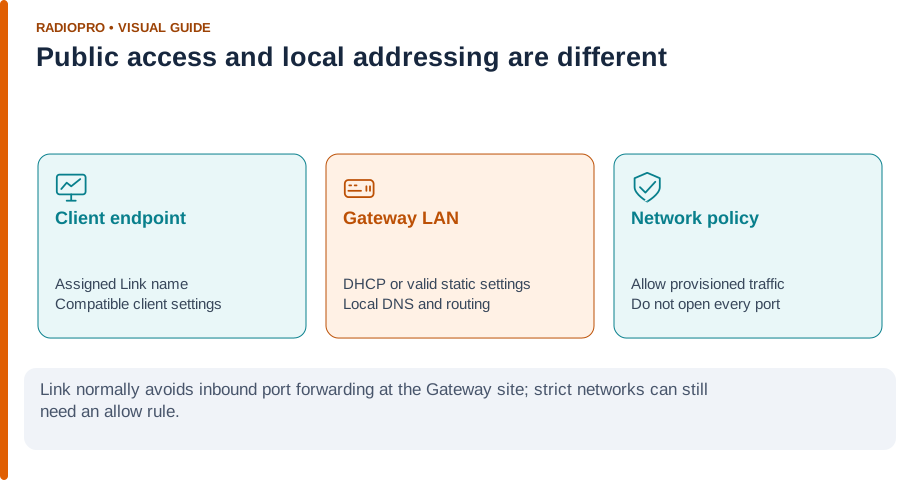
Many internet providers, including Starlink and most cellular carriers, place customers behind carrier-grade NAT (CGNAT). The site's router shares a public address with other subscribers, so an inbound port-forwarding rule cannot open a path to the Gateway. Remote clients lose their connection, and remote configuration through ICU stops working.
How RadioPro Link Works
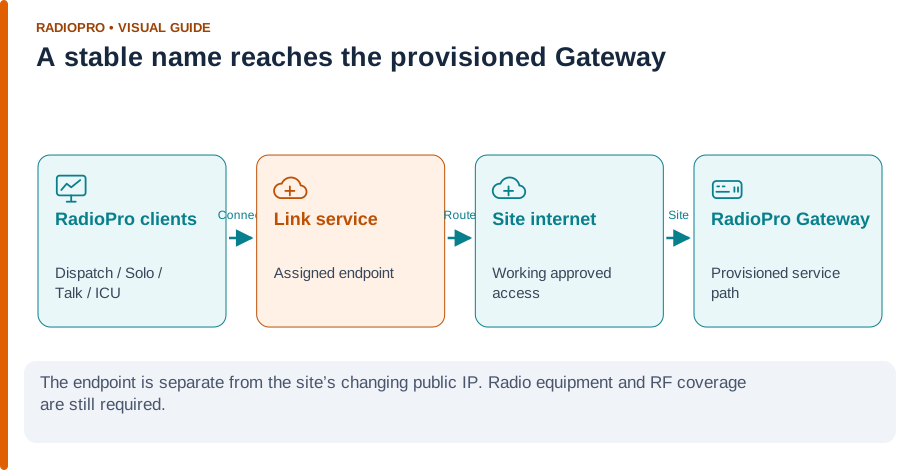
RadioPro Link replaces the site's changing public IP address with a stable endpoint provisioned by CTI. Clients connect to that endpoint, and the Gateway reaches it over whatever internet connection is available at the site. Traffic is carried over a single port and is encrypted end to end.
Getting started is simple:
- Choose a name for each Gateway
- CTI provisions the endpoint and ships a preconfigured Gateway
- Connect the Gateway to any internet connection
- Point your clients at the endpoint URL instead of an IP address
With DHCP enabled, a Link Gateway can move between networks — from wired fiber to Starlink to an LTE hotspot — and clients keep using the same endpoint. RadioPro Link supplies the network path; the Gateway still needs a working internet connection and the control station still needs RF coverage of your field radios.
- Find us in the Motorola Application Catalog
How to Buy RadioPro
RadioPro products are sold through authorized two-way radio dealers. A dealer will help design your system, provide pricing, and ensure compatibility with your existing radio equipment.
Find a Dealer Near You
Radio IP Gateway
Dispatch Software for PC
Solo Client for PC
Talk Mobile App for iOS and Android
Get in Touch
- Phone:
+1 (513) 595-5900
+1 (855) 284-8872 - Email:
info@ctiproducts.com - Address:
1211 W Sharon Rd
Cincinnati, OH 45240
USA
Link Features
|
Feature |
RadioPro™ Link |
|---|---|
| Works Behind CGNAT (Starlink, Cellular) | |
| No Static Public IP Required | |
| No Port Forwarding or VPN | * |
| End-to-End Encryption | |
| Move Between Internet Connections | |
| Automatic Reconnection | |
| Remote Configuration with ICU |
* - Typical Starlink and default-router setups need no network changes.
Networks with strict outbound policies may need an allow rule for the provisioned service.
See Does RadioPro Link require a static public IP address or port forwarding?
Links
Announcement:
Frequently Asked Questions:
IP Gateway:
Get RadioPro Link:
RadioPro Link changes the network route, not the application. The following RadioPro applications can connect to a Gateway through its provisioned Link endpoint.
Supported Applications
| Application | Platform | Use Through Link |
|---|---|---|
| RadioPro Dispatch | Windows PC | Full radio-console access to the licensed Gateway connections |
| RadioPro Solo | Windows PC | Single-channel access to one Gateway at a time |
| RadioPro Talk | iPhone, iPad and Android | Push-to-talk over Wi-Fi, LTE or 5G |
| ICU (IP Gateway Configuration Utility) | Windows PC | Remote Gateway configuration with an administrative account |
Gateway accounts, client permissions and RadioPro licenses still apply. Contact CTI or your dealer to confirm compatible Gateway and client versions.
Feature Highlights:
Starlink Field Testing
Tested on Starlink Mini, stationary and in motion
In September 2026 CTI tested RadioPro Link over a Starlink Mini on the Roam plan, with a RadioPro client on wired office internet. Figures below are client-to-Gateway network timing; they do not include radio call setup or the RF path.
In-town outages were roughly 5–10 seconds each, most likely caused by buildings and trees obstructing the dish. The Link connection recovered automatically every time.
| Condition | Typical Round Trip | Outage Time |
|---|---|---|
| Starlink, stationary | 64 ms | None observed |
| Starlink, highway motion | 64 ms | None observed |
| Starlink, in-town motion | 68 ms | 1.4% |
| Wired reference (also through Link) | 49 ms | None observed |
Results from one test configuration; not an uptime or performance guarantee for another site. See the full Starlink Mini test results.
Where RadioPro Link Fits
Put a radio channel online wherever there is internet
- Disaster recovery — stand up dispatch on Starlink when wired service is down
- Rural and remote sites — where satellite or cellular is the only option
- Mobile base stations — Gateways in vehicles or trailers that move between locations
- Temporary job sites — move the Gateway between projects without reconfiguring clients
- Remote management — configure Gateways with ICU without visiting the site
- Simplified setup — no router changes or IT tickets for typical installations
- ISP-agnostic — switch providers without changing client settings
- Starlink backup — keep a secondary path ready behind your primary connection
Basic Dispatch testing over a Verizon 4G LTE MiFi showed no noticeable added audio latency. Geostationary satellite links work mainly for remote configuration, since their 500–600 ms latency is high for live voice.