
Networking: DHCP (Dynamic Host Configuration Protocol)
What It Does
DHCP is a client-server protocol that automatically assigns IP addresses (and related configuration like subnet mask, default gateway, and DNS server addresses) to devices joining a network, eliminating the need to manually configure networking settings on every device by hand.
How It Works: DORA
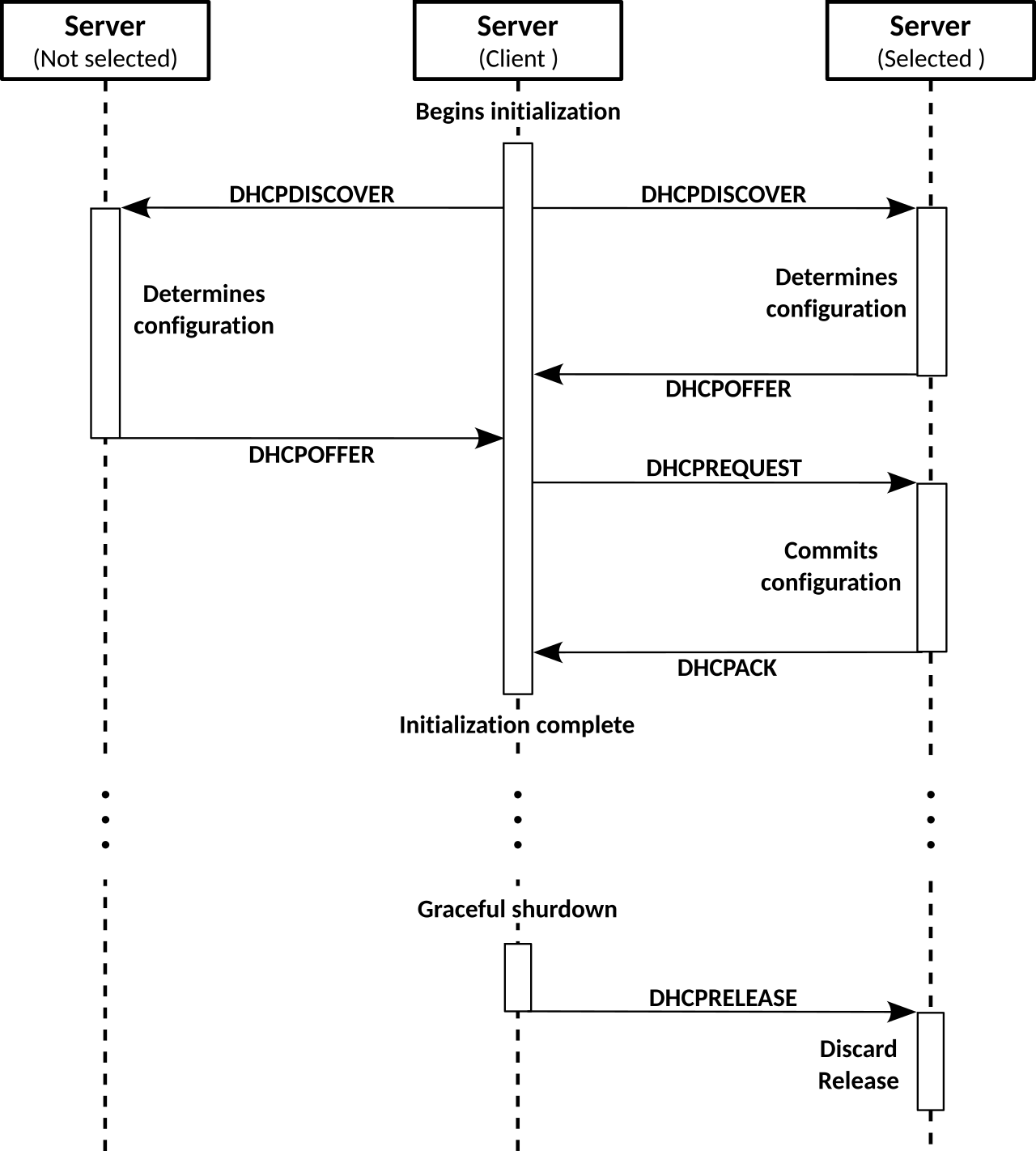
DHCP address assignment follows a four-step exchange often remembered by the acronym DORA:
- Discover — a device joining the network broadcasts a request asking if any DHCP server is present.
- Offer — a DHCP server responds, proposing a specific IP address along with subnet mask, gateway, and DNS server details.
- Request — the device confirms it wants to accept that specific offered address.
- Acknowledge — the DHCP server confirms and formally assigns the address to the device.
Leases, Renewal, and Reservations
A DHCP-assigned address isn't permanent — it's a lease for a defined duration set by the server. Well before the lease expires, the client tries to renew it (commonly attempting renewal with its original server around the halfway point of the lease, and if that fails, broadcasting to any available DHCP server later in the lease as a fallback "rebind" attempt) so that, under normal conditions, a device keeps the same address indefinitely through back-to-back renewals without ever needing to repeat the full DORA process. The address can still change, though — if a device is off the network past its lease expiry, or the original DHCP server is unreachable and a different server hands out a different address during rebind — which is exactly the "IP changed after a reboot/lease expiry" scenario referenced below.
A DHCP reservation combines DHCP's centralized management with a static address's predictability: the administrator configures the DHCP server to always hand a specific device (identified by its MAC address) the same IP address, every time, while that address is still technically served via DHCP rather than manually configured on the device itself. This is a common middle ground for infrastructure devices where centralized visibility/management is valuable but the address still needs to never change.
DHCP Across Multiple Subnets: Relay Agents
Because a DHCP client's initial Discover message is a broadcast, and routers don't forward broadcast traffic between subnets by default, a DHCP server can only directly hear Discover messages from clients on its own local subnet — unless a DHCP relay agent (often configured on a router as an "IP helper address") is set up on each other subnet. The relay agent listens for DHCP broadcasts on its local segment and forwards them as regular unicast packets to a central DHCP server elsewhere on the network, letting one DHCP server serve many subnets rather than requiring a dedicated DHCP server on every single segment.
Common Misunderstandings
- "DHCP always gives the same device the same address" — only guaranteed with a reservation; otherwise a renewed lease is usually the same address (many servers try to re-offer a client's previous address) but is not guaranteed to be, especially after an extended absence from the network or if the original server becomes unavailable.
- "Disabling DHCP secures the network" — not by itself; an attacker (or a legitimate device) can simply configure a static IP address manually. DHCP's presence or absence is an operational/management convenience, not an access-control mechanism — real access control belongs at the firewall/ACL or authentication layer, not the address-assignment layer.
- "A static address left inside the active DHCP pool is harmless as long as no one else uses it yet" — it's a ticking time bomb: as documented in Troubleshooting RoIP and Gateway Connectivity, a static address that overlaps the DHCP pool eventually gets handed out to a DHCP client too, producing a duplicate-IP conflict with the classic symptoms of intermittent connectivity and flapping ARP entries. Always exclude statically-assigned addresses from the DHCP scope/pool.
Related Pages
- Networking: IPv4
- Networking: DNS
- Networking: Unicast, Broadcast, and Multicast
- Troubleshooting RoIP and Gateway Connectivity
- IP Networking in Two-Way Radio Systems
References
See also: CTI product documentation
This article is part of the CTI Products Knowledge Base. Questions about RadioPro or MCN products? Call +1 (513) 595-5900 or email info@ctiproducts.com.
Informational only. This article is general background and is not engineering, safety, legal or regulatory advice. Verify requirements with the equipment manufacturer and the applicable authority before relying on it. Product names and trademarks belong to their respective owners.